I’m Joshua Sortino, a Miami + NYC-based Design Director, advisor, and investor. I will improve your startup’s user experience, design culture, and team. We should talk →
Test prep that grades your confidence, not just your answers
Co-founder, Product & Design · studysignal.app · 2026

A right answer isn’t always a known answer
Every practice test on the market scores the same way: right or wrong, then a percentage. A lucky guess counts the same as a question you could teach, and a confident mistake hides inside a decent score until test day finds it. StudySignal asks one more thing after every answer, how sure were you?, and grades the pair. The score is still there. What changes is what a student does next.
I co-founded it with Michael Weber, an SAT and ACT tutor who had been grading his students this way by hand for years. I designed and built the product: the web app, the native iOS app, the teacher tools, the brand, the billing. Students practice and get the analysis free; generating new tests and worksheets from their own history, and the teacher dashboard, are paid.
Practice
Worksheets
Analysis
One tap, before you see the result
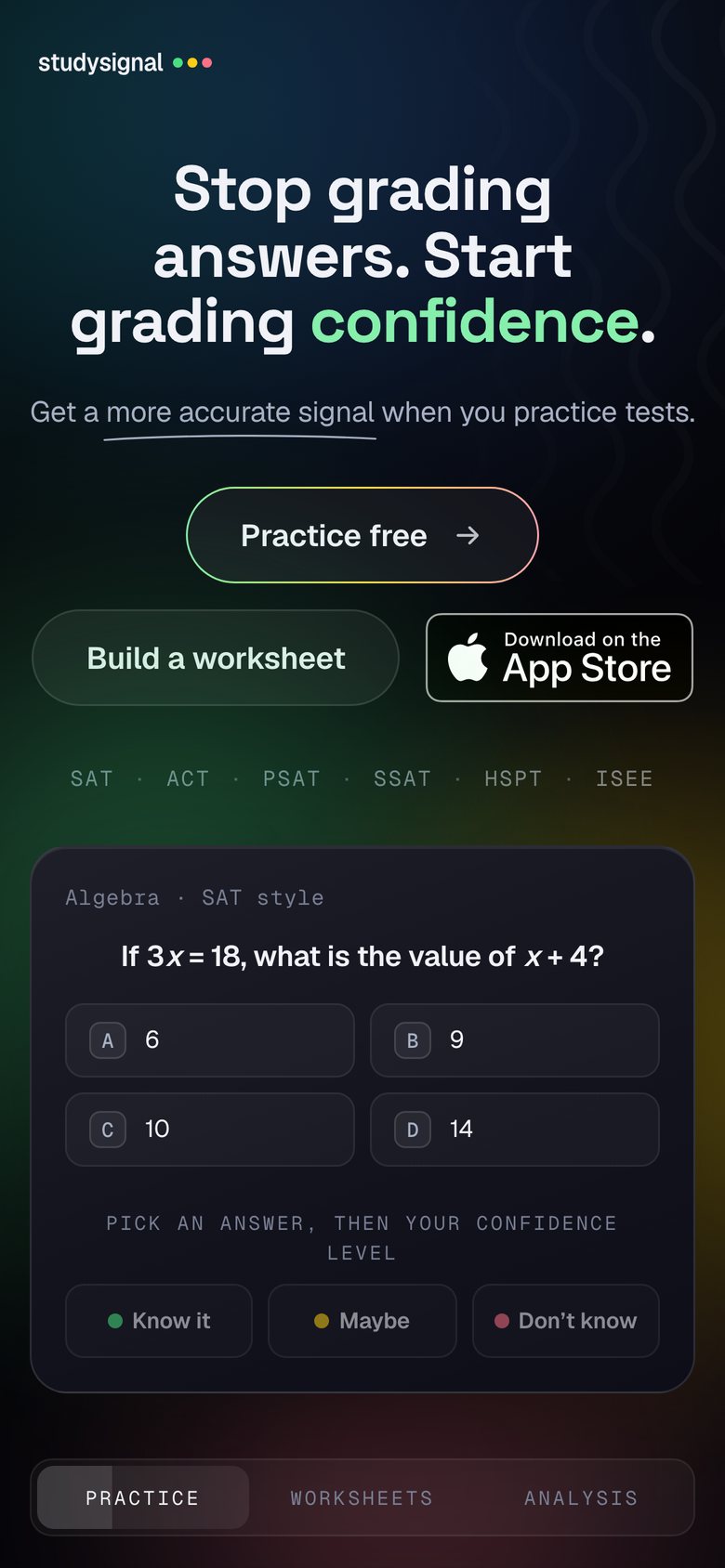
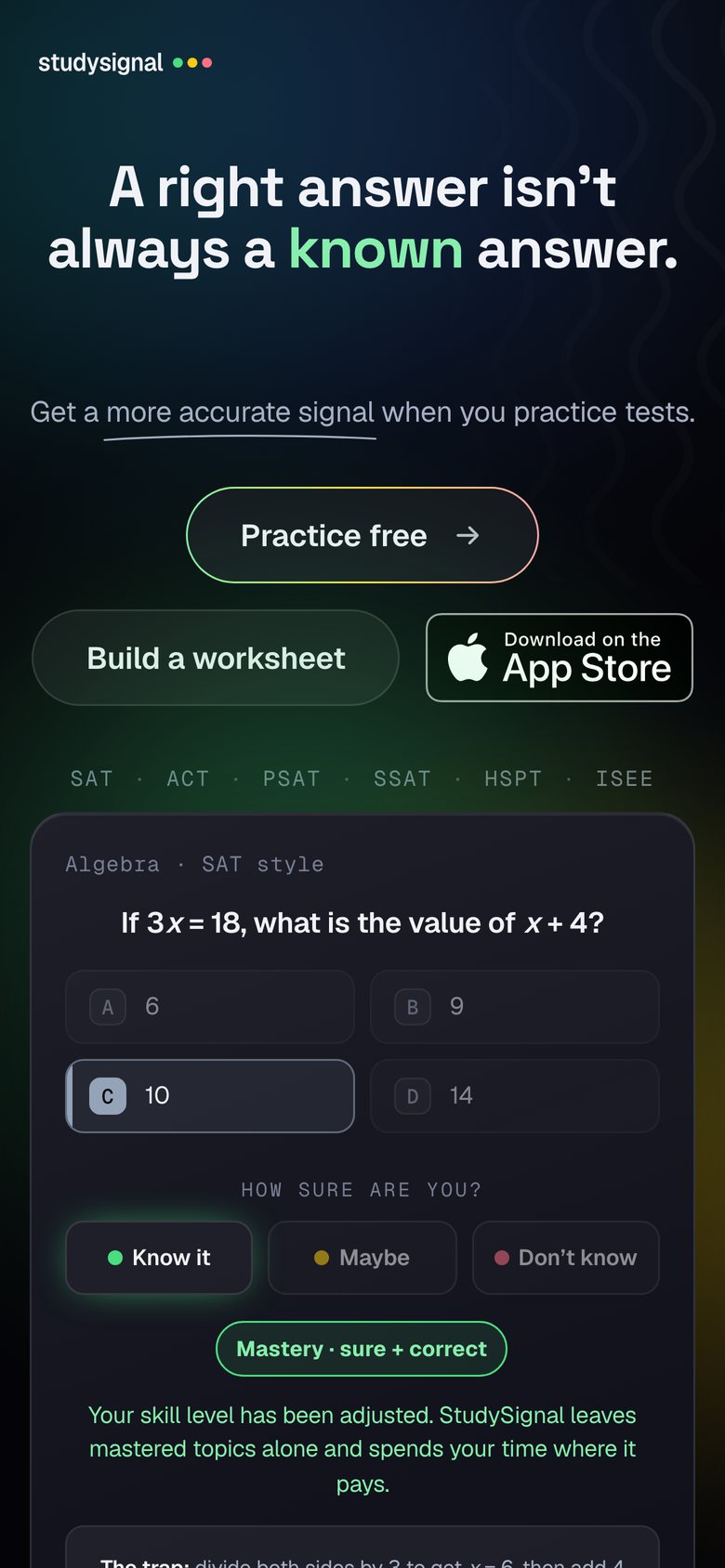
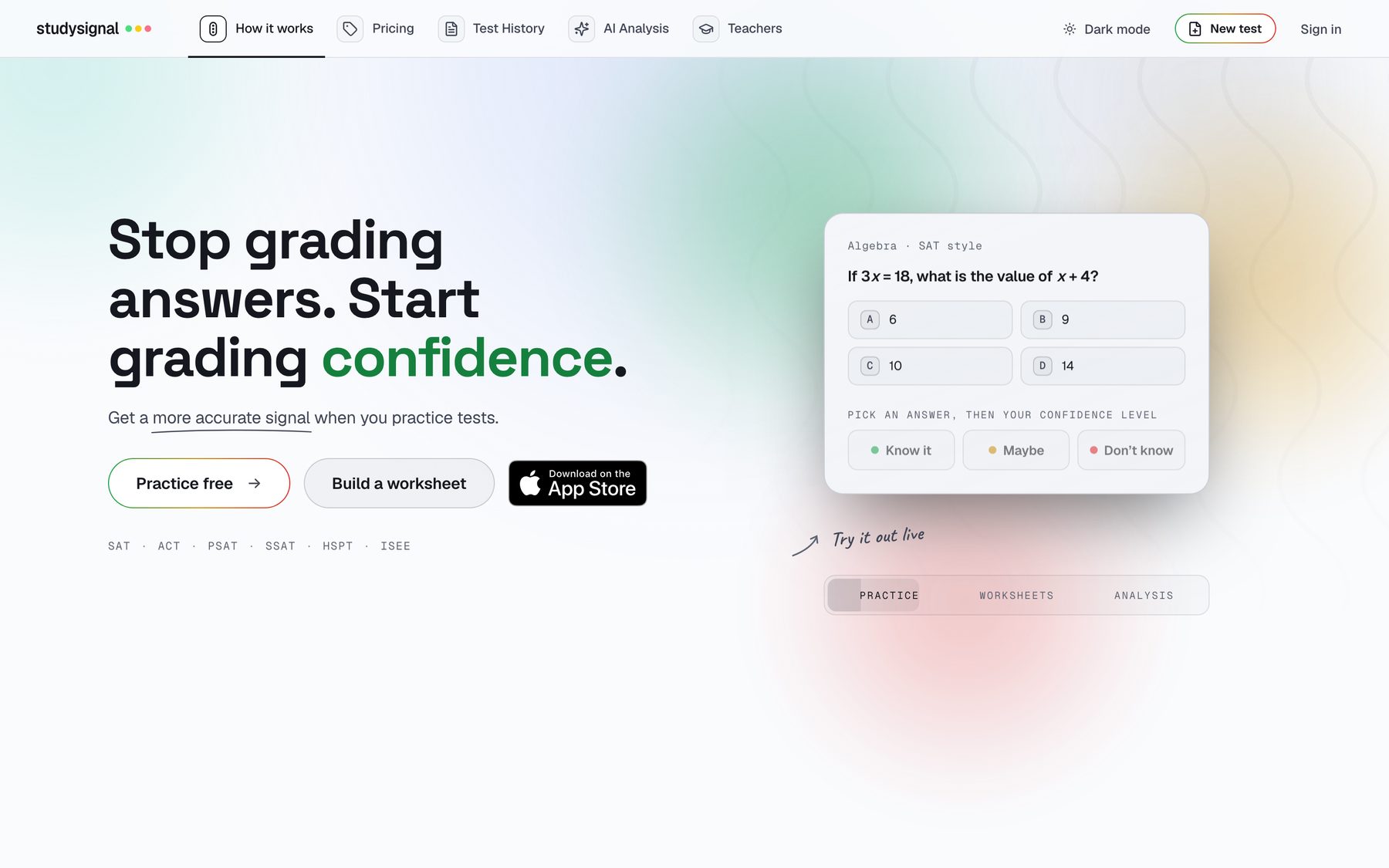
The whole product rests on one interaction. After picking an answer, the student taps Know it, Maybe, or Don’t know. That tap locks the answer. There is no submit button, and no way to see whether it was right first, so the read on their confidence is honest. Most of the design work went into making that second tap feel like part of answering rather than a survey bolted on after it.
Real questions, real tools
SAT and PSAT style questions across every topic and difficulty tier, rendered with KaTeX, with the same Desmos calculator and reference sheet the student gets on test day.
Choices shuffle every time
The same question can have its answer at A one sitting and D the next, so nobody learns letter positions.
The signal is the submit
Green, yellow and red are disabled until an answer is picked. Picking one commits both at once and moves on.
Six grades instead of one percentage
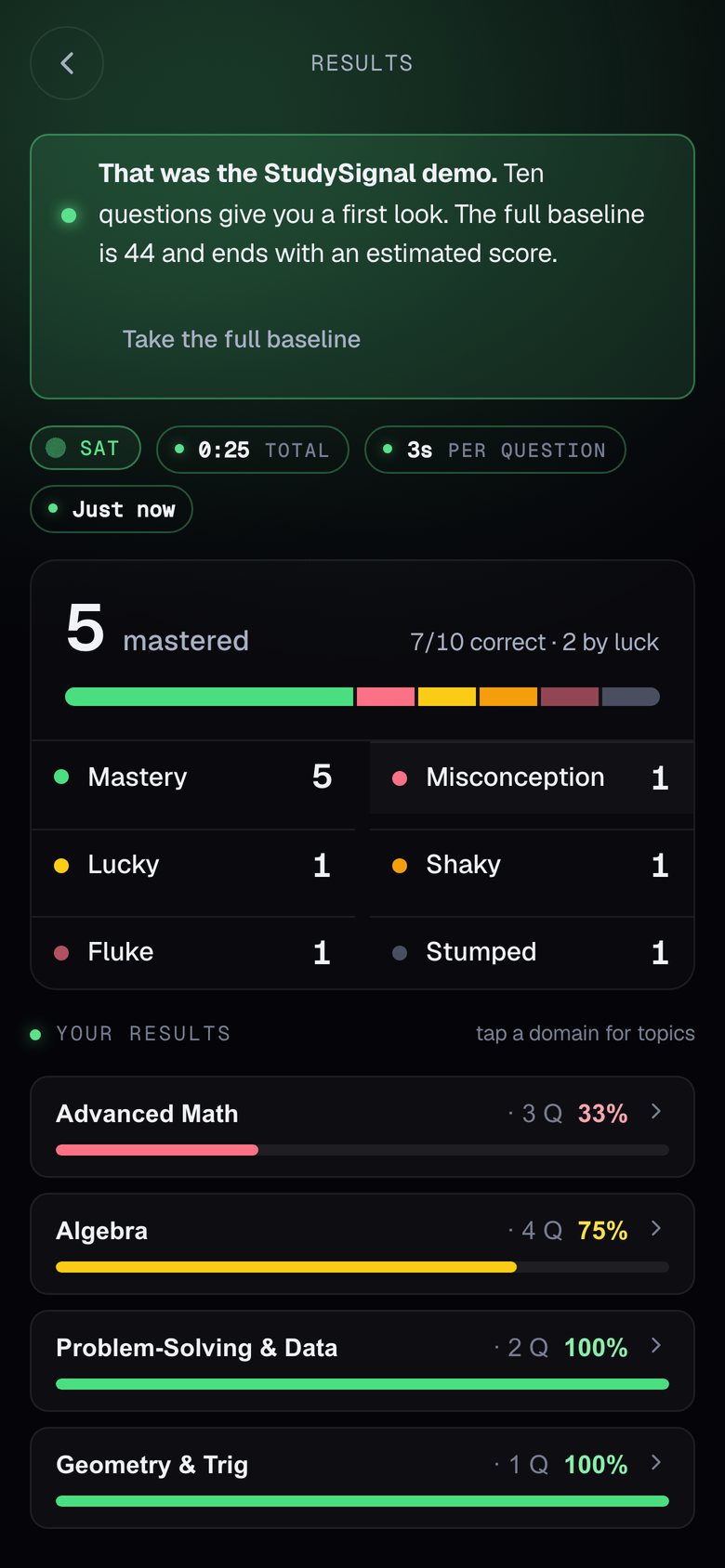
Crossing the answer against the confidence sorts every question into one of six outcomes. Two of them are the whole reason the product exists: a Misconception is a question the student was sure about and got wrong, the most valuable thing on the page because they did not know they had it, and Lucky is a right answer they were not sure of, which will not survive test day.
- Masterysure + correctBanked. The review skips it.
- Misconceptionsure + wrongReteach it. They did not know they had it.
- Luckyunsure + correctFirm it up before test day finds it.
- Shakyunsure + wrongHalf-known. Drill it.
- Flukeguess + correctA guess that landed. Counts for nothing.
- Stumpedno idea / skippedStart from the beginning.
Here is a 7 out of 10 the way StudySignal scores it
Signal review: the loop that closes
Questions that were sure and correct do not need another look, so the review skips them. It walks the student through every lucky guess and confident mistake one at a time: their answer, the correct one, a worked explanation and the distractor logic, then a fresh question on the same topic to prove it stuck.
1. Replace x in f(x) with the entire expression g(x) = x + 2: f(g(x)) = 3(x + 2) − 1.
2. Distribute and simplify: 3x + 6 − 1 = 3x + 5.
– 3x + 1: forgot to multiply the 2 by 3 when distributing.
– 3x − 3: used f(x − 2) instead of f(x + 2).
– 3x + 6: forgot the −1 from f.
A confident mistake, explained
1. The Pythagorean theorem: a2 + b2 = c2, so 62 + 82 = 36 + 64 = 100.
2. c = √100 = 10. This is the 3–4–5 triple, doubled; worth knowing by sight.
– 14: added the legs instead of their squares.
– √28: subtracted the squares, the move for a missing leg.
– 7: a guess between the two legs.
A lucky one, firmed up
Where the AI lives
StudySignal is an AI product with no chat window. The model is in two places. It writes questions into the bank, where a tutor approves every one before a student sees it, and it decides what the next test is made of by reading the mastery radar that the signal builds. The student meets all of that as one button. There is no prompt box, nothing streams in, and nobody is asked to “ask AI”: the output of the AI is a test, which is what they came for. The rainbow pill is reserved for the actions that produce one.
Build from what you missed
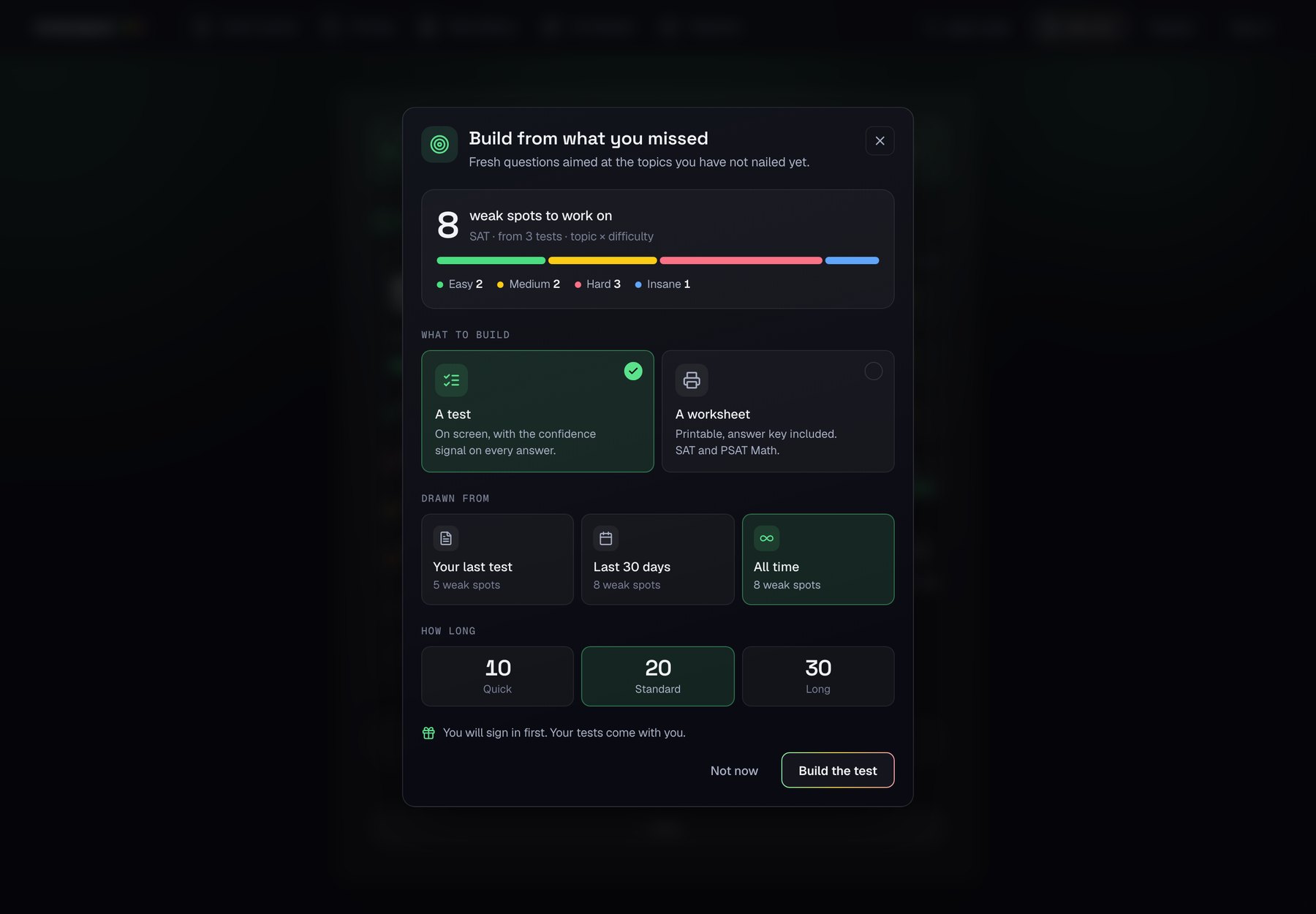
One sheet replaces the four paywalls that used to be scattered through the app, and it says what it is about to build before it builds it. Eight weak spots, from three tests, as a bar of difficulty tiers so the mix is visible, not promised. Then three decisions: a test on screen or a printable worksheet with its answer key, drawn from the last test, the last thirty days or all time (each option shows its own count), and how long. Every control is free to touch; the lock, when there is one, sits on the single button that makes something. A guest can set the whole thing up and is told, once, that signing in comes first and their tests come with them.
The mix is arithmetic you can read
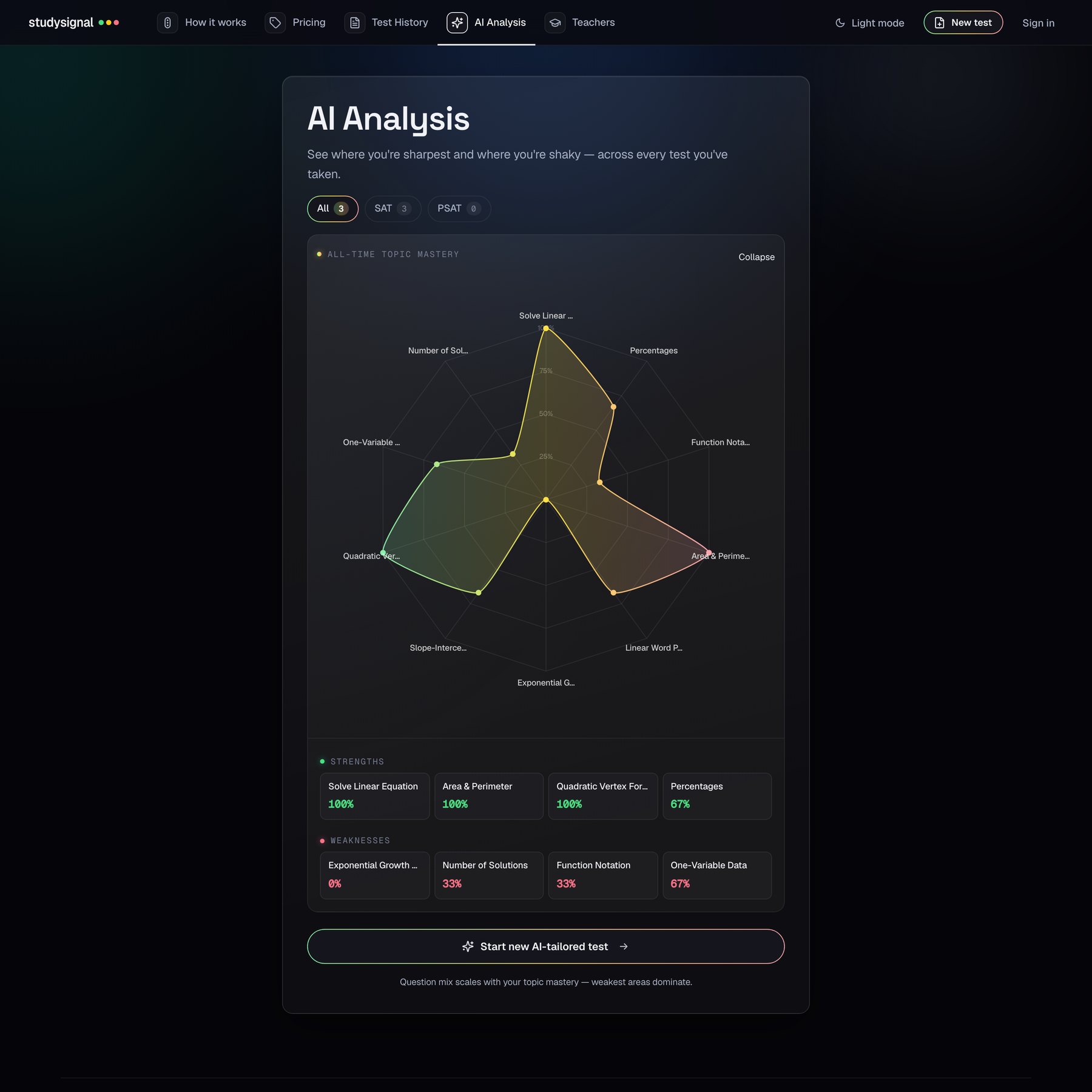
Any topic under 80 percent mastery is in. Each one’s share of the test grows with the square of how far below mastery it sits, so a topic at 30 percent gets far more than one at 70, and a floor keeps every weak topic in the draw. A little jitter means two builds from the same radar never come out identical. Mastery itself is the signal’s definition, right and green, so a run of lucky guesses cannot talk a topic out of the mix.
A control that says what it decided
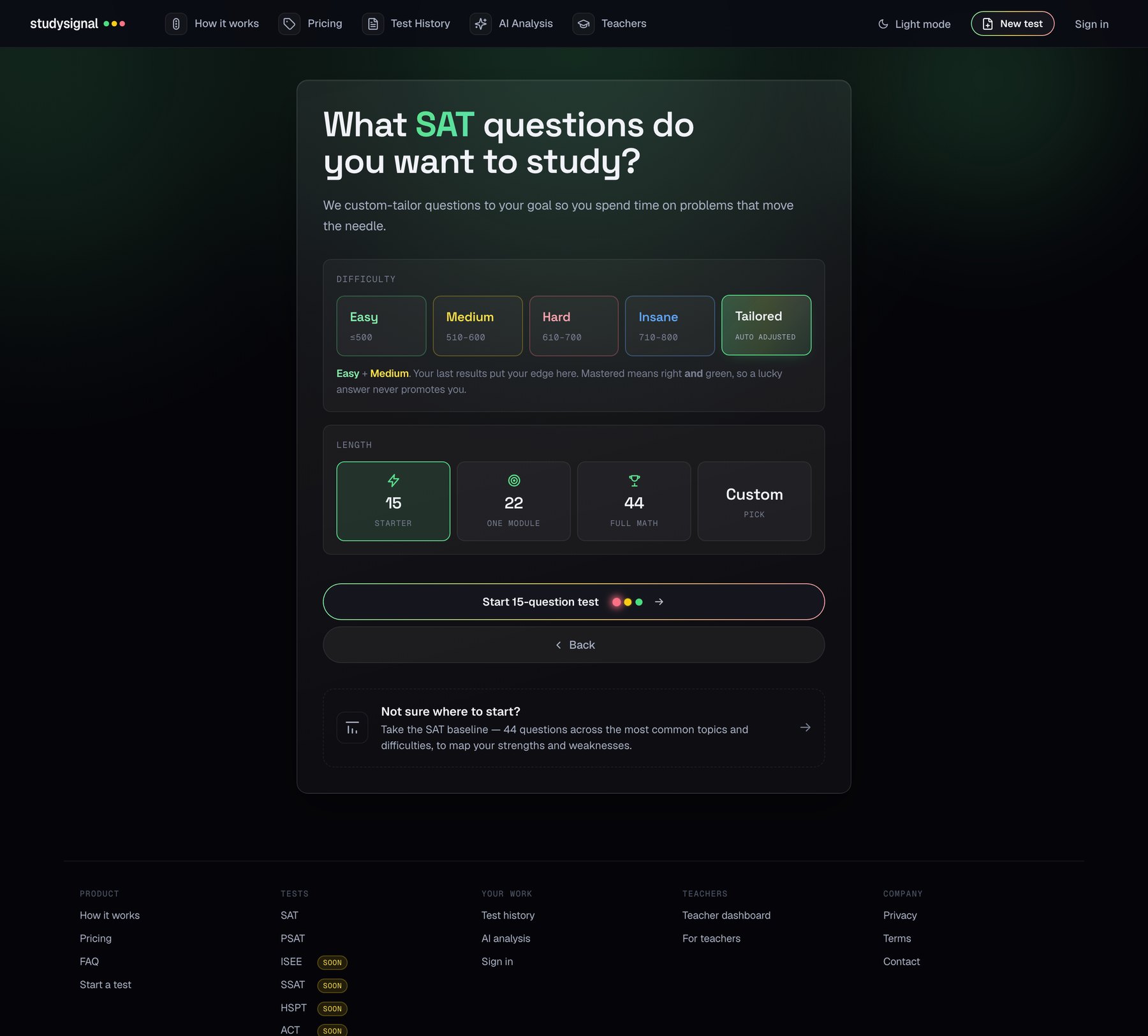
Difficulty is a free multi-select, Easy to Insane, and Tailored is a fifth tile that means pick for me. It aims at the student’s working edge: a tier counts as mastered at 80 percent right-and-green over at least four questions, and Tailored takes the lowest tier they have not mastered plus the next one up as stretch. A control that changes what you practise on your behalf has to say what it chose, so the hint names the tiers and the reason. That makes it falsifiable. A student who thinks they are past Medium can see that the product disagrees, and why. With no results yet it starts at the bottom two and says so: this first test is the measurement.
Written by a model, approved by a tutor
The generative part is the bank. Claude writes originals to the same schema as the hand-written questions: a section, a topic, a difficulty on the 400 to 800 scale, a stem, four choices or a typed answer, wrong choices that come from real slips (a dropped sign, an off-by-one, the wrong setup) rather than random numbers, and a worked explanation. It re-solves each problem before committing the answer. Every generated item lands stamped with its model and batch in a needs review state, which the admin can filter to, and a couple in every hundred will be wrong, so nothing a model wrote reaches a student until Michael has approved it. The record below is one of them.
If f(x) = 3x and g(x) = x² + 1, and h(x) = f(g(x)) − g(f(x)), what is the value of h(2)?
- −22
- −12
- 12
- 22
Explanation g(2) = 5, so f(g(2)) = 15. f(2) = 6, so g(f(2)) = 37. h(2) = 15 − 37 = −22.
- source
- ai-generated
- model
- claude-opus-4
- batch
- 1 · 2026-04-29
- state
needs-reviewlive
Same score, different students
This is the pitch to teachers in one picture. Two students both score 7 out of 10. A gradebook calls them the same student. The signal does not.
Student A
Six sure and correct. One lucky. The three misses were already flagged as unsure, so nothing here is a surprise. Drill the one lucky topic and move on.
Student B
Two sure and correct. Five lucky. Two confident mistakes hiding inside the 7, and this score will not survive test day. Everything here needs work, starting with the two they are sure about.
For teachers: print a worksheet in a minute, know which students guessed
The teacher side is two things. A worksheet builder that pulls from the live question bank, topics down the side and difficulty across the top, with every cell showing how many questions it holds, so a sheet never comes back short. And a roster where every attempt carries the student’s own signal: share one link, students join the moment they open it, and each row shows who knew it and who guessed. From there a teacher can tap the weak cells in one student’s grid and send a test built for exactly those.
The same signal, in your pocket
The native iOS app runs the same questions and the same signal, with history in sync between phone and web. The web app is built to the same screen, so a student who starts a set on a laptop can finish it on the bus.
A brand with three rules
The wordmark is the product in miniature: the name, set in Geist, and the three dots of a stoplight. Green, yellow and red carry exactly three sanctioned meanings in the interface, the confidence signal, the difficulty heat ramp, and plain status, and never a fourth, so the colours keep their meaning on every screen. A selected control changes its colour and fill, never its border weight. Every token composes from one set of variables, which is how the light theme is the same product and not a second one. The style guide is public at studysignal.app/design/styleguide and links the shipping stylesheet, so the components on it are the real ones.
Under the hood
No framework. The web app is one hand-rolled stylesheet of tokens and one script, served static, with serverless functions in front of a Postgres database for accounts, attempts, the question bank and the teacher rosters. Sign-in is Google or a magic link. Math is KaTeX, charts are Chart.js, the calculator is Desmos, and the billing is Stripe: students $10 a month or $25 every three months for generated tests and worksheets, teachers $28 a month with a 14-day trial. The bank holds close to 8,000 live questions across SAT, PSAT, ACT, SSAT, HSPT and ISEE, every one calibrated by a tutor, and ships behind a test suite that runs before each deploy.
Student
Practice any test, the baseline, the Desmos lessons, signal review and the AI analysis.
Student Plus
Generate new tests and worksheets from your own history. Or $25 every three months.
Teacher
The worksheet builder, the roster and targeted tests, with the student plan included. 14 days free.
Sixteen years of tutoring, built in
Michael developed the Signal Method over sixteen years of SAT and ACT tutoring, and teaching core math from elementary school through calculus: evaluate the multiple choice result, then read the confidence behind the answer. The six outcomes and the adaptive review above are that method turned into software. He calibrates every question in the bank; I own the product.
 Joshua SortinoCo-founder, product & design
 Michael WeberCo-founder, SAT & ACT educator
Takeaways
The product is one extra tap. Everything else, the six grades, the review loop, the radar, the roster, the targeted tests, is downstream of asking a question nobody else asks and refusing to show the answer until it is answered. The hard part was not the analysis. It was making that tap feel like part of answering, on a phone, under time, so that students actually tell the truth. The AI stayed where it earns its keep, writing the bank and reading the radar, and the student never had to type a word to it.


